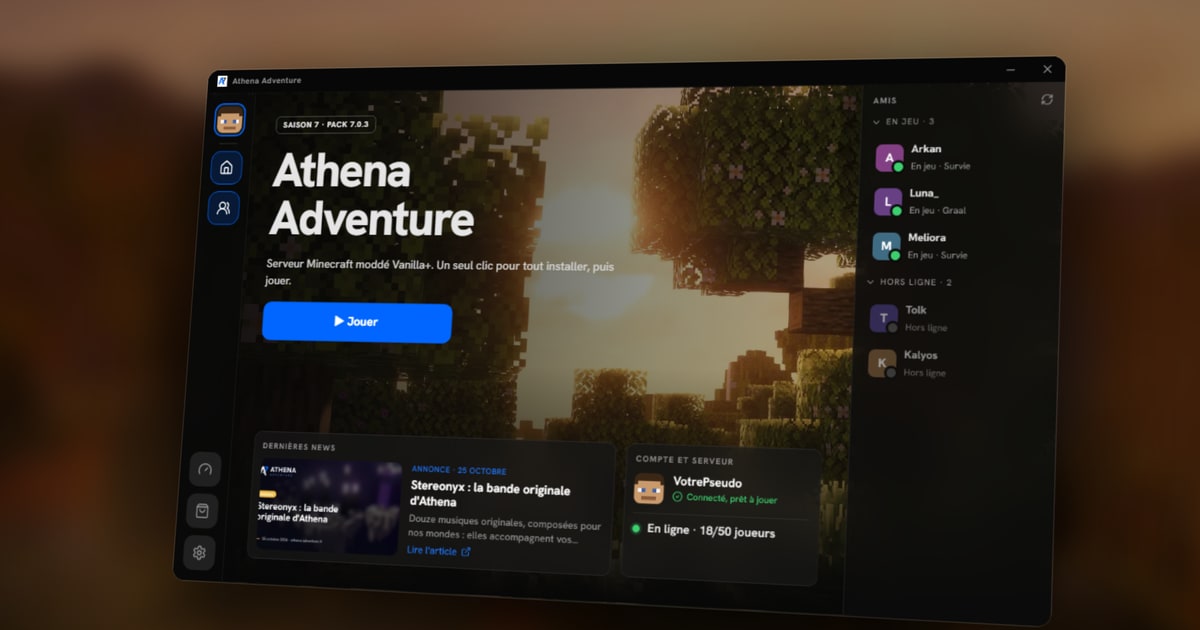
Many of you have told us over the seasons: joining a modded server is often the least fun part. You have to find the right Minecraft version, the right mod loader, the right pack, allocate memory, and start again with every update… And if one step goes wrong, your gaming evening turns into a troubleshooting evening.
For season 7, we tackled the problem at its root: Athena now has its own launcher.
Three steps, and you’re in
Download
Get the installer from the Play page and run it. The launcher opens on its own.
Sign in
With the Microsoft account linked to your Minecraft. You sign in with Microsoft: we never see your password.
Play
The first launch installs everything in a few minutes. After that, one click on Play is enough.
Everything it does for you
The full installation. Minecraft, NeoForge and every mod in the pack, each at the right version. Nothing to copy into a folder, nothing to configure.
Updates. When we publish a new version of the pack, the launcher downloads it on its own. It only fetches the files that changed, and picks up where it left off if your connection drops. The launcher updates itself too.
Connecting to the server. The Play button sends you straight to Athena. If the server was asleep for lack of players, it wakes up as you arrive.
Settings for your PC. The launcher analyses your machine and picks the memory to give the game. If your computer is a bit short, you can turn off the heaviest mods (shaders, far view distance) without breaking the rest of the pack.
Your friends and the news. Without even starting Minecraft, you can see who’s online and who’s in game, the latest server news and the photo of the week taken by a player.
And if something goes wrong?
Repair
A damaged file, or one deleted by mistake? The launcher checks the whole installation and downloads whatever is missing.
Roll back
A version giving you trouble? Go back to the previous one while we fix it. Your worlds and settings stay put.
Move
More space on another drive? The game folder can be moved from the settings, without reinstalling everything.
A pack verified end to end
Every version of the pack we publish is signed by the team. Before installing anything, the launcher checks that signature, then the fingerprint of every file. If a single byte doesn’t match, it refuses to install it. You can be sure you’re playing with exactly the files we published, and nothing else.
The launcher will be available from the Play page when the server opens. If you get stuck, the wiki’s installation guide covers everything step by step, and the team answers on the Discord.